lost to detention in one year
US for-hire trucking, 2023: $3.6B in direct costs and $11.5B in lost productivity. 39.3% of all stops had detention, adding up to more than 135 million hours.
Source: ATRI, Sept 2024Load proof
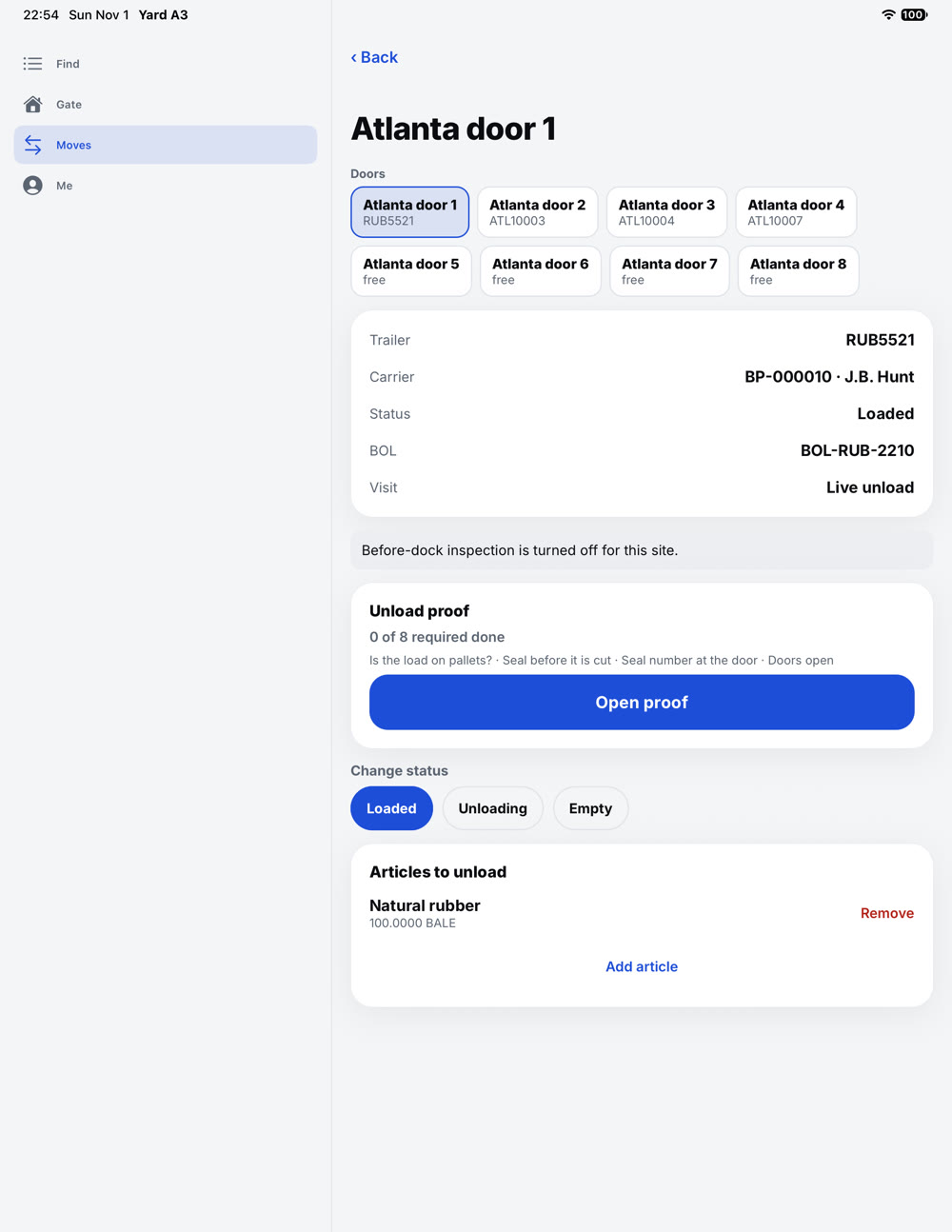
Count, photo and seal are checked against the BOL and order while the truck is still at the door. Every capture is stamped with the time, the place within about 5 metres, and the device.
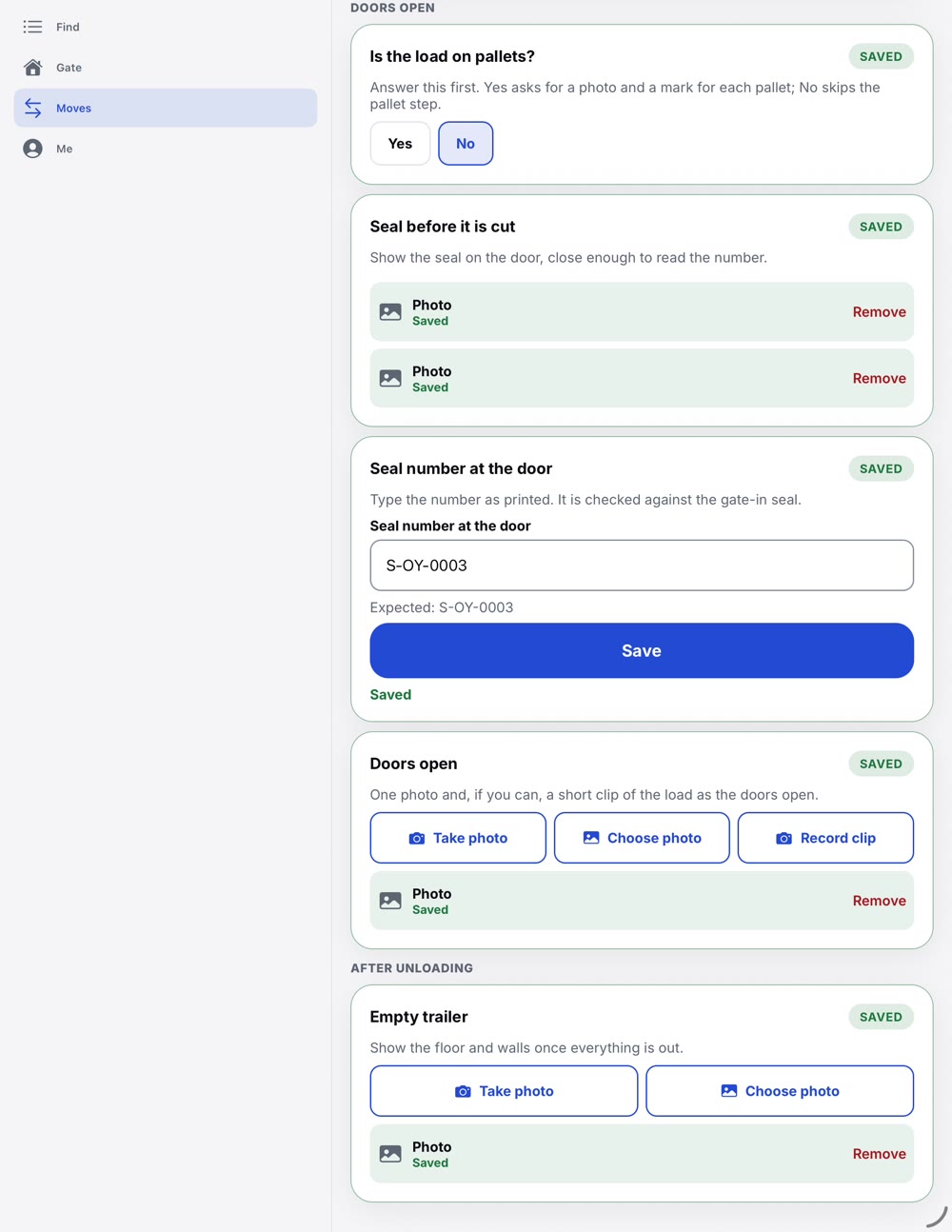
At the door
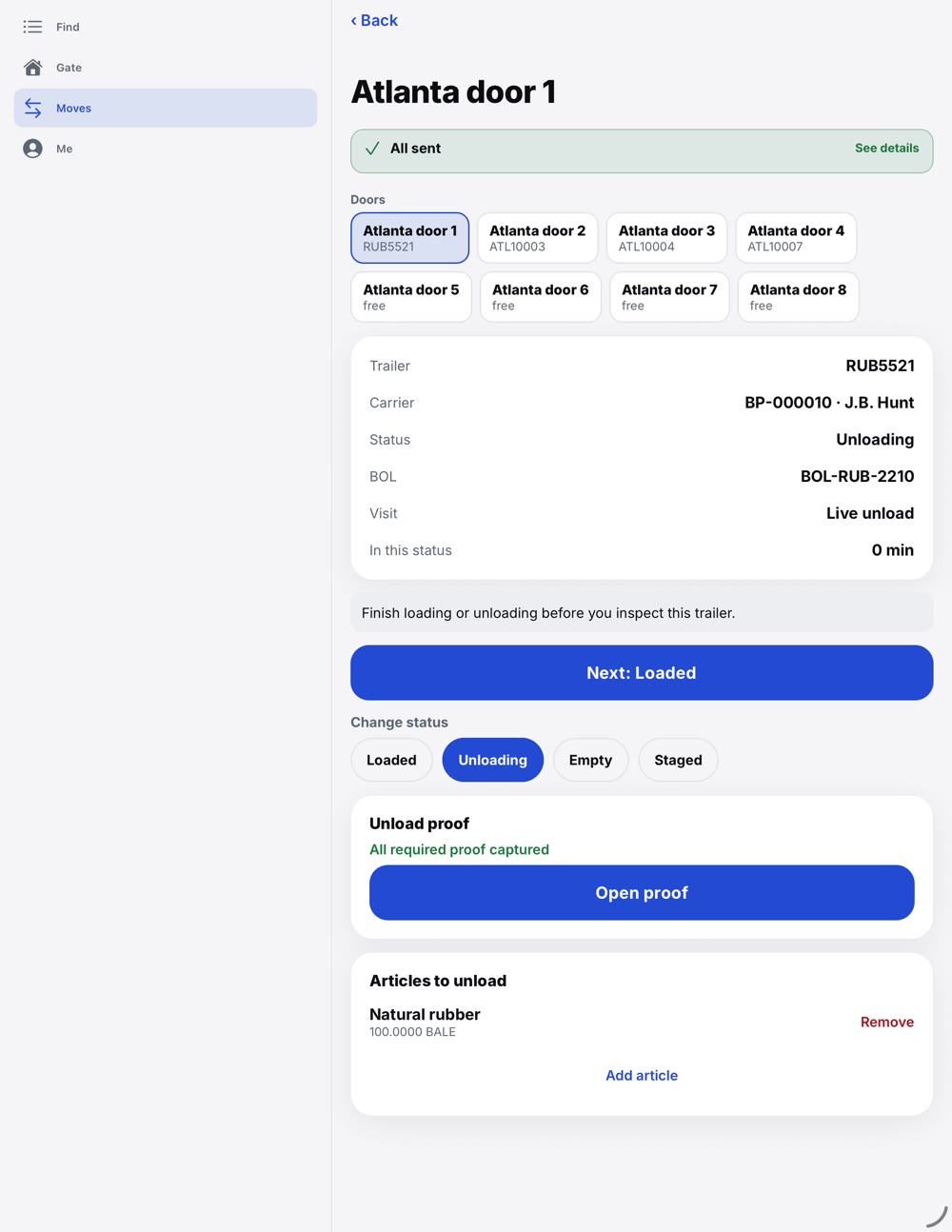
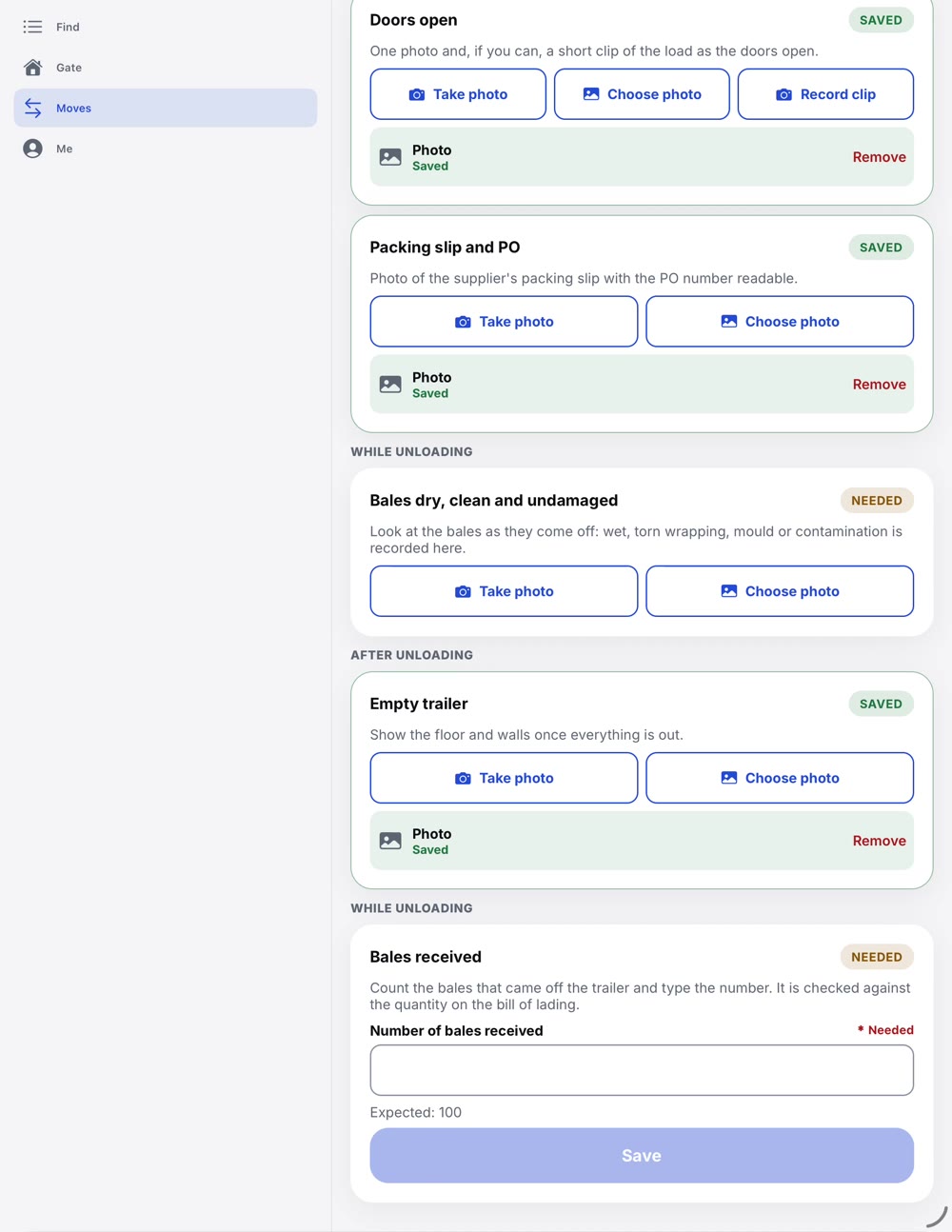
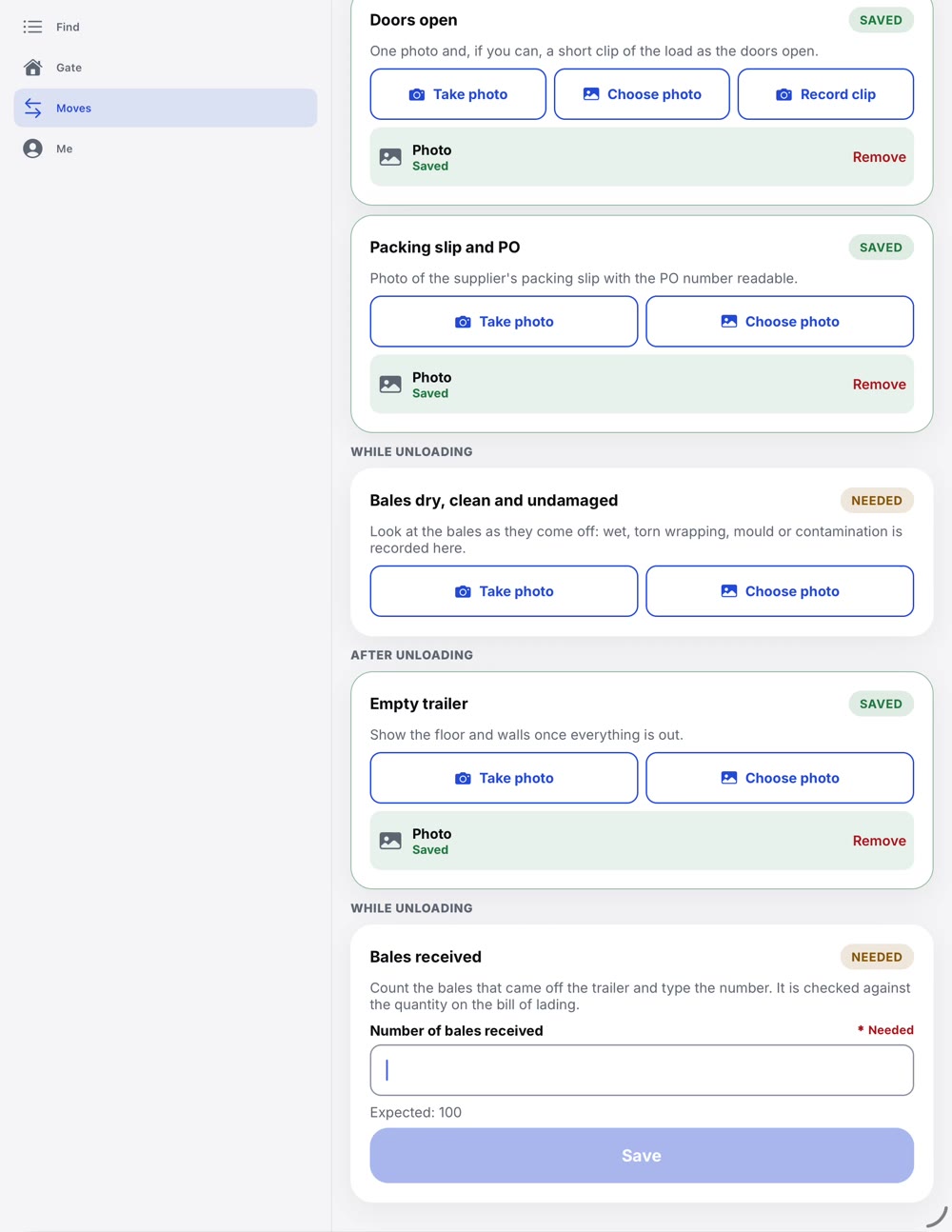
On the tablet, the load proof walks the person at the door through each check, with photos taken or picked from the library. The record keeps every count, photo and time on the visit.
The claim you did not cause
×Without a record from the door
You pay $2,400 for damage you cannot disprove.
✓With floDock
The evidence answers the claim. You pay only what is yours.
The TCompanies survey is from 2018 and covers container and trailer damage in the United States. The claim amount above is an example, not a quoted figure.
Load proof
What it is worth
The door screen shows the trailer, partner, bill of lading and each item, so the right freight meets the right trailer.
The same checklist and photos before and after dock work show what changed at your dock.
Every status change is time-stamped on the visit, so each visit can be audited.
Loading starts on time because the right team is at the right door.
What not knowing costs
US for-hire trucking, 2023: $3.6B in direct costs and $11.5B in lost productivity. 39.3% of all stops had detention, adding up to more than 135 million hours.
Source: ATRI, Sept 20242,646 confirmed cargo thefts in the US and Canada, up 18%. Losses were up 60%, and the average theft was worth $273,990.
Source: CargoNet via Work Truck Online, Jan 2026In Q3 2026, 138 of 547 thefts were fake pickups, up from 18% a year earlier. 19 thefts were worth $1M or more, and warehouses and distribution centers were the most targeted places.
Source: Verisk CargoNet, Nov 2026Walmart's on-time, in-full rule sets a 98% target and fines misses at 3% of the cost of goods. A shipment you cannot prove is a shipment you can be fined for.
Source: Talk Business & Politics, Sept 2020Real cases: the booking was right, the person who showed up was not
An alleged theft scheme took over real carriers' identities, booked loads from brokers, and had drivers collect them at distribution centers. At least 24 shipments never arrived.
FreightWaves, Oct 22, 2026From March 2020 to September 2023, one person posed as staff at real and fictitious carriers and brokers, won loads, then redirected real drivers to warehouses he controlled. About 90 shipments, mostly liquor and copper. Five years in federal prison and $10.3M restitution.
Transport TopicsEight people were indicted in Manhattan for cloning real licensed carriers' identities from public FMCSA data. The fake carriers passed screening because they resolved to active authorities, then took freight that never arrived.
LeadingIT on the June 2026 indictmentSanto Tequila lost 24,000 bottles. Thieves made fake carrier profiles, bid on the job, hired real drivers online and redirected them from the Pennsylvania warehouse to Los Angeles. About 11,000 bottles were recovered.
CBS News, Oct 2025TAPA Americas warned of "trojan drivers": operatives hired by vetted carriers, who park at a staged break while the crew takes a high-value load. Carrier credentials and background checks come back clean.
Heavy Duty Trucking, Apr 23, 2026A legitimate carrier passed every check, then its email was hacked. Thieves sent a different truck to pick up a frozen-meat load. It was recovered, mishandled, refused, and became a claim.
FreightWaves, Apr 9, 2026How floDock answers
The driver arrival pass
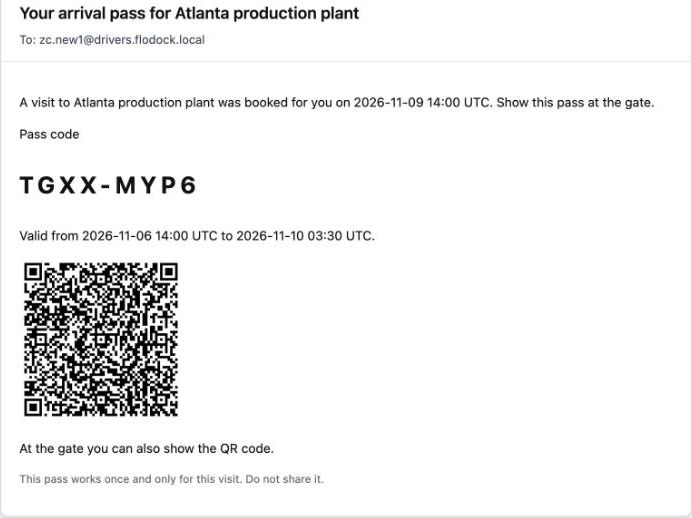
Your yard decides how strict to be: off, optional, or required. The gate refuses a missing, wrong, used or replaced pass, and a supervisor can admit with a reason that is saved.
The carrier enters the driver's name, phone and e-mail.
One pass for that driver and that visit, by e-mail: an 8-character code and a QR.
Shows the code or QR, from the e-mail or the Partner app.
The clerk scans or types it. An optional ID check compares the driver's name.
The pass is used up and the check-in is logged. A copy cannot get a second truck in.
Show this code to the guard at the gate.
Riley Chen
Valid until Mon, Nov 9, 2:00 PM
No signal? The guard can also type the code from your e-mail.
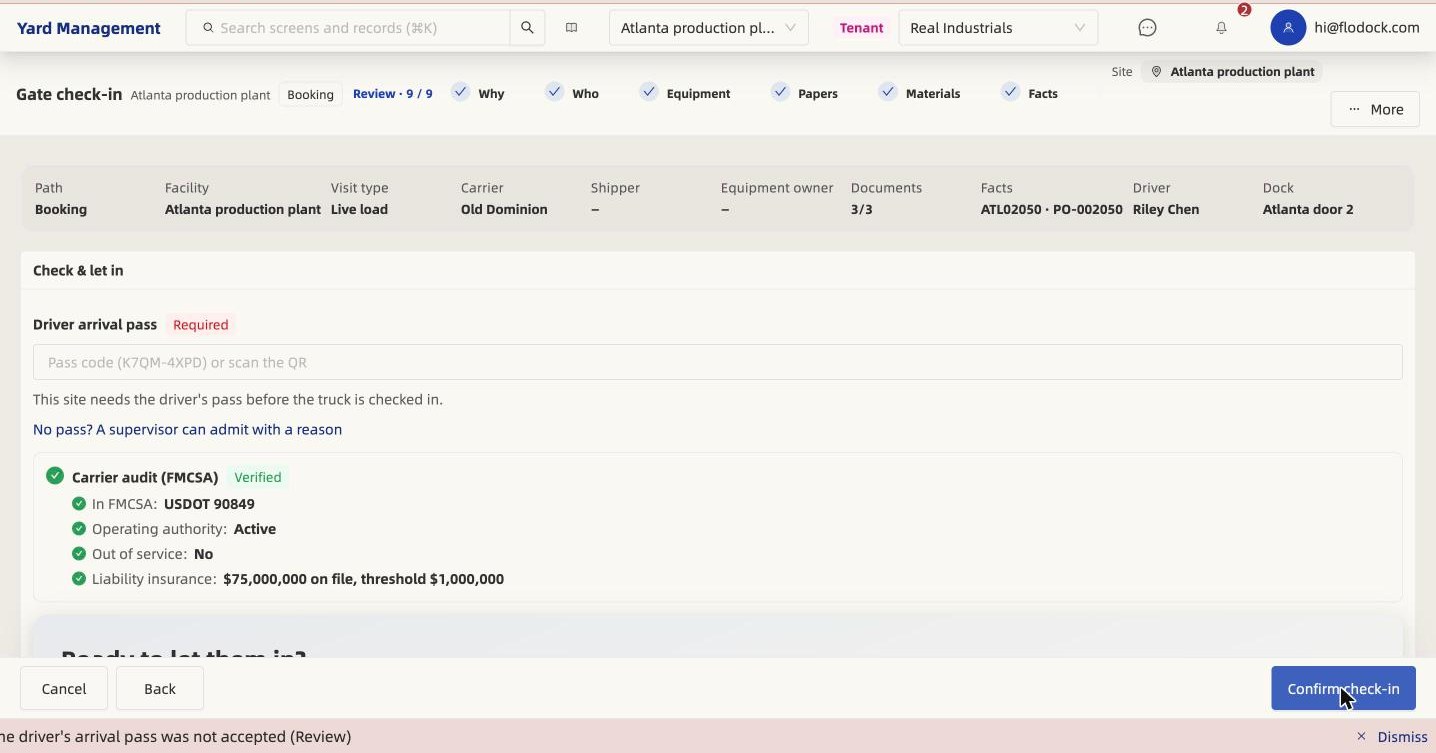
At the gate: who showed up?
A mismatch is flagged before the trailer moves, and the driver, plate and trailer photos are saved with the visit.
On the dock: how long did it really take?
For a 3PL, this is the answer to "who held the truck?" when a detention bill or a customer complaint arrives.
Detention, with proof
Free time, tier breakdown, and accrued charges for this visit. Policy comes from site rules and any partner overlay.
Tier breakdown
Free time, tiers and supervisor adjustments are all on the visit. At gate-out the charge locks, so the invoice cannot drift.
At the gate: no retyping
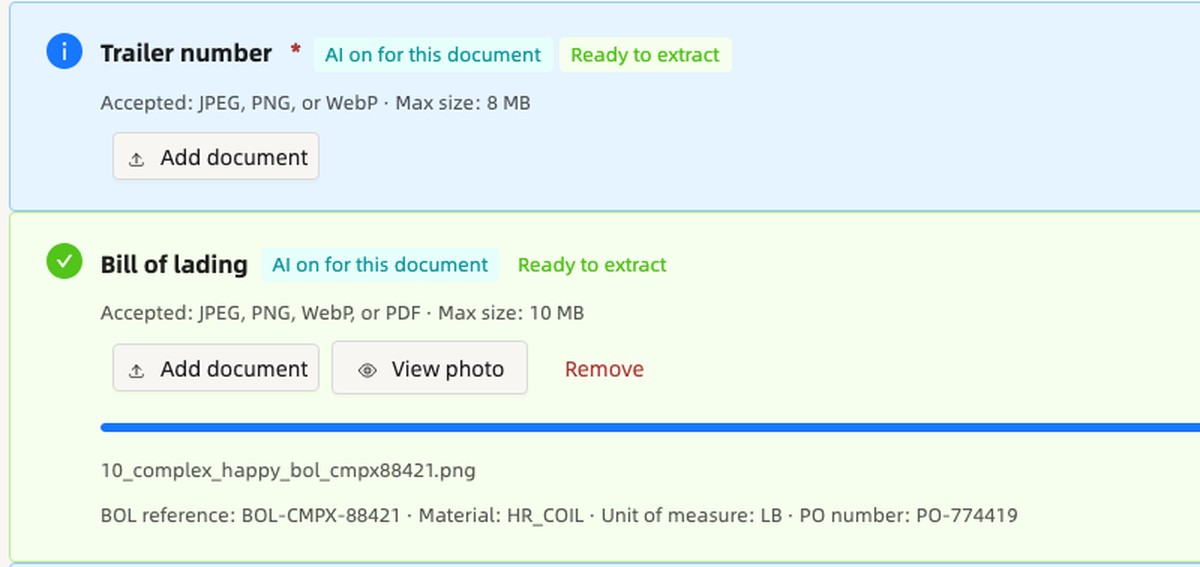
The BOL reference, material, unit and PO number come from the photo. Trailer number and licence plate can be read the same way.
Put your own numbers in
Change the inputs. The sums are shown, and the assumptions are yours.
See it work
What it does
The operator counts and photographs at the door.
The app compares with the BOL and order and flags a mismatch.
The capture is locked with time, place and device.
In depth
Definition
Load proof is the record of what was on a trailer when it was loaded or unloaded at your dock door. floDock captures it at the door, while the truck is still there: the seal, the open doors, the count against the bill of lading and the photos, each stamped with the time, the place and the device.
Most disputes about freight start after the truck has left. Load proof moves the evidence to the one moment you can still see the freight, so a damage, shortage or seal question can be answered from the visit record instead of from memory.
The record
Every item below is saved on the visit, not in a phone's camera roll, so anyone with access to the visit sees the same record.
| Item | What is captured | Why it matters in a dispute |
|---|---|---|
| Seal number | The seal read at the door, compared with the booking | Shows whether the seal that arrived is the seal that was expected |
| Doors-open photo | The empty trailer before loading, or the freight as it arrived before unloading | Shows the condition of the trailer and the freight before your crew touched it |
| Packing slip and bill of lading | The paper attached to the visit | Ties the physical load to the document the customer or carrier relies on |
| Count against the bill | Units counted compared with the bill of lading and order line | Answers shortage and overage claims with a number recorded at the door |
| Loaded or unloaded photo | The trailer after work, with the doors closed and the seal applied | Shows what left, or what was left, at the end of the dock work |
| Time, place and device | Time stamp, location within about 5 metres where the phone allows it, and the device used | Shows the capture was taken at your door, at that moment, on that device |
| Reason code on a mismatch | A reason entered before the step can be closed | Keeps the exception explained on the record instead of hidden |
| Time taken | How long loading or unloading ran | Backs up dwell and detention charges with the time at the door |
At the door
The Yard app on a phone or tablet walks the operator through the same sequence on every visit, so the record looks the same whoever is working the door.
Exceptions
A mismatch does not stop the work, and it does not disappear. The app asks for a reason code before the step can be closed, and the difference stays on the record with the photos and the time stamp.
That matters later: a shortage that was explained at the door on the day is a very different conversation from a shortage first raised by a customer a week afterwards.
Claims
Load proof gives you evidence to put in front of the party making the claim. It does not decide the claim for you, but it replaces "we think" with a dated record.
Reliability
Dock doors are not always where the signal is. The Yard app saves captures on the device and syncs them when the connection returns. If the phone cannot say where it is, the capture is still saved and marked as such, so a weak GPS fix never blocks the work at the door.
Comparison
Many yards already take photos and keep paper. The gap shows up when a claim arrives and someone has to find them.
| Paper and camera roll | floDock load proof | |
|---|---|---|
| Where it lives | A clipboard, a phone, a shared folder | On the visit, next to the booking and the bill of lading |
| Time and place | Whatever the file or the handwriting says | Time, place within about 5 metres where available, and device saved with each capture |
| Mismatches | Noted, or not | A reason is required before the step closes |
| Finding it later | Search by memory | Open the visit and the evidence is there |
| Sending it | Copy, rename, attach | Assembled from the visit into the claim |
Teams
Dock operators capture it at the door. Yard and gate supervisors see open mismatches across the site. Claims, customer-service and finance teams open the visit when a claim, a chargeback or a detention question comes in. When a customer or carrier needs to see the proof, the evidence is shared as a secure, read-only link.
Questions
Seal, doors open, packing slip, count and the empty trailer, before, during and after the load. Each capture is stamped with the time, the place to within about 5 metres and the device.
A mismatch asks for a reason, and the reason is saved on the visit with the photos, so the exception is explained at the door, not weeks later.
Yes. The Yard app saves captures offline and syncs when the connection returns.
The person at the door, on a tablet or phone. They follow the same checklist before and after dock work, with a photo when something is wrong.
No. The dock screen shows every door, its trailer and its papers. Load proof is the evidence captured at that door, and it sits on the same visit record.
Talk to our team and we will walk through your gates, doors and carriers.
Talk to our team